
Warning: Undefined array key "ID" in /var/www/html/software/mm/authorize/meta-code.php on line 8

Warning: Undefined array key "pv" in /var/www/html/software/mm/authorize/meta-code.php on line 9

Warning: Undefined array key "pv" in /var/www/html/software/mm/authorize/meta-code.php on line 10

Deprecated: substr(): Passing null to parameter #1 ($string) of type string is deprecated in /var/www/html/software/mm/authorize/meta-code.php on line 10

Warning: Undefined array key "pv" in /var/www/html/software/mm/authorize/meta-code.php on line 11

Deprecated: substr(): Passing null to parameter #1 ($string) of type string is deprecated in /var/www/html/software/mm/authorize/meta-code.php on line 11

Warning: Undefined array key "pv" in /var/www/html/software/mm/authorize/meta-code.php on line 12

Deprecated: substr(): Passing null to parameter #1 ($string) of type string is deprecated in /var/www/html/software/mm/authorize/meta-code.php on line 12
Meta Imaging Series Codes
logo
 
Meta Imaging Series Codes

For instructions, please scroll down.

Please note that codes are case-sensitive!

STEP 1

Your Meta Imaging Series Version Registration Code for system is:

Enter this code, exactly as shown, within the "Registration Code" field of the Meta Imaging Series Installer and Updater programs.

STEP 2

Your Meta Imaging Series Version Authorization Code is:

Enter this code, exactly as shown, within the "Authorization Code" field of the Meta Imaging Series Installer and/or Updater program. This will allow the Updater to continue updating your system to the latest version.

STEP 3

Your Software Maintenance Plan will expire on:

Please contact your local sales representative if you would like to renew or extend your software maintenance plan.

INSTRUCTIONS

Insert the Registration Code from STEP 1 into the Meta Imaging Series Updater
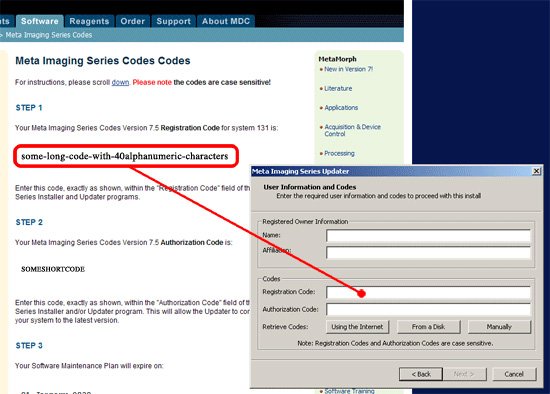
registration code

Insert the Authorization Code from STEP 2 when prompted with the following dialog box:
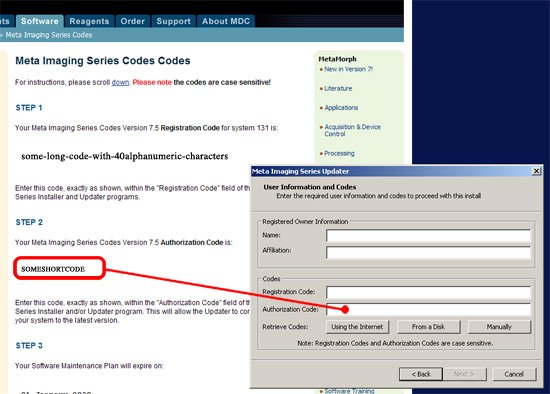
authorization code